

Which Pedals Should You Use With Your Modeler?
The best way to make sure your guitar tone is unique while using a modeler is to add extra pedals that your modeler can’t duplicate. Use your modeler for basic effects, then add your favorite overdrive, delay, reverb, or modulation pedal to go beyond the sounds your modeler can deliver.
No Fear Gear may earn a commission on purchases made through links on this page.
Is it Counterproductive to Use Separate Pedals with a Modeler?
Not at all; many world-famous guitarists perform live with a hybrid rig with modeler and extra pedals. Kirk Hammett (Metallica) uses Cry Baby wah pedals and Tube Screamer overdrive in front of his Fractal Axe-FX. John Mayer combines his Neural DSP Quad Cortex with analog drive and delay pedals like the Klon Centaur and Way Huge Aqua-Puss. Adding just one or two choice pedals can take a good-but-generic modeler tone and make it sound like you.
Why You Should Add a Tuner Pedal to Your Amp Modeler
The first pedal you should consider adding to your hybrid modeler rig is a tuner pedal. Why would you use a separate pedal instead of your modeler’s built-in tuner? The first reason is to have a foolproof mute button on your board via the tuner’s footswitch: not all modelers have easy and fast access to the tuner to mute your signal.
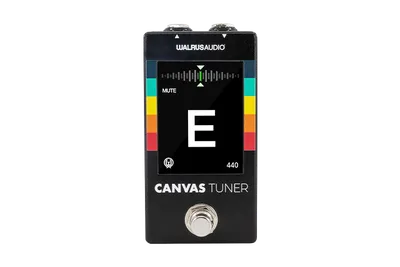
The next reason to use a tuner is for enhanced tuning techniques; for example, the TC Electronic Polytune polyphonic tuner allows you to quickly tune all six strings in a single strum. The Peterson Strobostomp Mini offers ultra-accurate strobe tuning, plus presets to save your custom tunings and “sweetened” tunings. And the Walrus Audio Canvas Tuner pedal features a built-in gig timer, a super helpful way to keep track of how long you’ve been on stage. These are just a few examples of how a separate tuner pedal can enhance your performance workflow.
Top Tuner Pedal Benefits:
- Adds a dedicated mute button to your pedalboard
- Allows you to use a strobe tuner for maximum accuracy
- Use a polyphonic tuner pedal to tune all six strings in a single strum


Supercharge Your Core Tone with an Overdrive Pedal
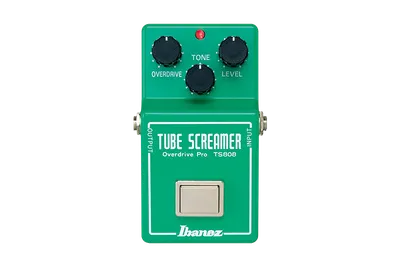
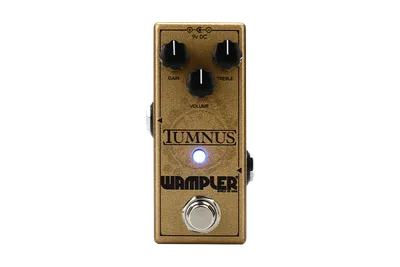
Adding an overdrive pedal in front of your modeler can make a huge impact in your overall tone, even when you don’t apply any gain. Mid-focused overdrives like the classic Tube Screamer and (my personal favorite) Wampler Tumnus will filter extreme lows and highs out of your signal before hitting your modeler, tightening your tone for maximum midrange impact. When you play at gig volume on stage, using a mid-focused overdrive gives your tone much-needed focus. It also gives you the added versatility of a volume control to adjust how hard you’re hitting the input of your amp models.
In my experience the modern generation of amp modelers respond to an overdrive pedal much like you’d expect the real amp to. You can keep the overdrive pedal’s gain down and use it as a volume boost, creating more harmonic intensity in your amp model. Or add a touch of gain from the pedal and set the amp model at a similar breakup point to create layered drive tones that get more intense when you dig in. Compare adding a drive pedal to using a digital drive pedal model in front of your amp model, and you’ll hear that there’s a big difference when using an actual pedal in front of your modeler.
Top Overdrive Pedal Benefits:
- Filter your tone for maximum impact with a mid-focused drive pedal
- Keep the gain low and use the volume control to hit the front end of your amp model harder
- Dial in layered edge-of-breakup drive tones in conjunction with your amp model, just like with a real amp
Create Next-Level Textures with Exotic Reverbs
If you’re an ambient player, reverb is a critical part of your tone. While amp modelers have come a long way, the built-in reverb on your modeler probably doesn’t offer as much versatility as a dedicated reverb pedal. Reverb pedals like the Strymon Nightsky offer more parameters and effects capabilities than the built-in reverb on your modeler will. Unique pedals like the EarthQuaker Devices Rainbow Machine create sounds you simply can’t achieve with built-in effects. And combination effects like the Keeley Vibe-O-Verb combine reverb with effects like phaser, vibrato, and harmonic tremolo in unique ways.
Top Reverb Pedal Benefits:
- Create complex textures beyond what your modeler’s built-in reverb can deliver
- Make fast adjustments to multiple parameters without menu diving
- Saves DSP for other effects


No-Compromise Delay Effects
The built-in delay on your modeler is fine for slapback echo and other basic delay duties, but it can’t compete with a dedicated delay processor like the Strymon TimeLine, Source Audio Collider, or the Meris LVX Modular Delay System. These are just a few examples of unique delay processors that give you more sound design capability than your modeler’s delay effect probably will. And the reality is that if delay is a big part of your tone, you probably already have a favorite delay pedal: plan to make it a mainstay on your pedalboard along with your modeler and you’ll have the best of both worlds.
Top Delay Pedal Benefits:
- Gives you fast access to dedicated controls for important parameters
- Can offer much more creative potential with advanced parameters and preset management
- Allows you to create complex delay textures without using excessive DSP on your modeler


Unique Feedback and Pitch Effects Pedals
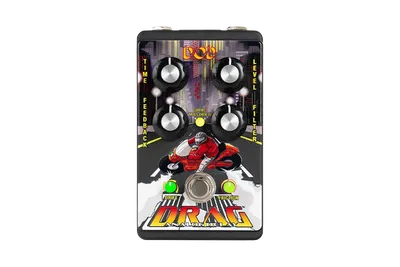
While your modeler probably covers all of the basic effects types, there are a ton of unique effects pedals out there that you won’t find on any modeler. Pedals like the DigiTech FreqOut Natural Feedback Creator, the HammerOn Instantaneous Pitch-Shifter, and the DOD Drag Analog Delay are good examples of unique effects that you’ll never be able to replicate with your modeler’s FX blocks.


Preserve Processing Power with Separate Pedals
When you’re creating your signal chain with your modeler, the most DSP-intensive effects are going to be reverbs, delays, and pitch modulation effects. Adding dedicated pedals to share some of the load will free up more DSP on your modeler. So if you’ve ever bumped up against the DSP limits of your modeler, or you think you may in the future, adding a dedicated reverb or delay pedal is your best solution.
Pedal Order Matters
Whether we’re talking about effects pedals in front of your modeler, or the order of effects blocks in your modeler, pedal order matters. Check out the video below to hear the difference pedal order makes with everything from your drive pedals to your reverbs, delays and modulation effects.
FAQs
Will offloading my reverbs and delays to external pedals noticeably fix my modeler’s DSP limits?
Yes; by using an external pedal you’ll free up a large amount of DSP. Using the “FX Loop” block in your modeler uses almost no DSP, compared to the resources you’d need for reverb, delay, and pitch effects.
Are there specific effects that are worth buying standalone pedals for to save processing power?
Reverb and delay are the most DSP-intensive effects, so using a standalone pedal for one or both of these would save you the most processing power.
Will adding external pedals let me change settings on the fly easier than diving into the modeler's menus?
Yes but not necessarily; external pedals will allow you to access dedicated controls quickly, but many modelers allow you to customize your button layout to include your most-needed parameters. In other words, your modeler can be optimized to minimize your need to dive into menus, but pedals will always offer a set of dedicated controls.
Can I use my modeler as a master MIDI controller to switch channels on my external digital pedals at the same time?
Yes; that’s a big part of the appeal of running a hybrid modeling pedalboard. External pedals with MIDI and Expression inputs can be integrated with whatever control options your modeler has available.
If I add external pedals, do I run them into the front input or use the modeler's FX loop?
You can run boost, overdrive and distortion pedals in front of your modeler’s input. Use the FX Loop for modulation and time-based effects, and arrange them in your signal chain wherever they sound best to you.
Will mixing digital modelers and analog pedals on the same power supply cause annoying ground loop hum?
Not if you’re using an appropriate pedalboard power supply with isolated outputs.
Does adding external pedals defeat the purpose of having a lightweight, single-unit grab-and-go rig?
Not if it allows you to achieve your ideal tone with maximum efficiency. Adding your go-to ambient reverb or delay workstation pedal to the convenience of your modeler will greatly expand your creative options without greatly expanding your rig.
Want to use your modeled amp tones to push real air?
Learn how to integrate your modeler with a real speaker cabinet in this article!
- Introduction
- Is it Counterproductive to Use Separate Pedals with a Modeler?
- Why You Should Add a Tuner Pedal to Your Amp Modeler
- Supercharge Your Core Tone with an Overdrive Pedal
- Create Next-Level Textures with Exotic Reverbs
- No-Compromise Delay Effects
- Unique Feedback and Pitch Effects Pedals
- Preserve Processing Power with Separate Pedals
- Pedal Order Matters
- FAQs
- Will offloading my reverbs and delays to external pedals noticeably fix my modeler’s DSP limits?
- Are there specific effects that are worth buying standalone pedals for to save processing power?
- Will adding external pedals let me change settings on the fly easier than diving into the modeler's menus?
- Can I use my modeler as a master MIDI controller to switch channels on my external digital pedals at the same time?
- If I add external pedals, do I run them into the front input or use the modeler's FX loop?
- Will mixing digital modelers and analog pedals on the same power supply cause annoying ground loop hum?
- Does adding external pedals defeat the purpose of having a lightweight, single-unit grab-and-go rig?


